Overview
Abacus Shopware Integration
The Abacus Shopware Integration connects your Abacus ERP with Shopware 6 and keeps both systems in sync. It brings product, price, stock, customer and document data from Abacus into your shop, and sends orders from the shop back to Abacus for processing. Most data flows automatically on a schedule or in near-real-time; a few steps — chiefly new-customer address processing — still require manual handling in Abacus. This page summarises exactly what the plugin does, how often it runs, and where its limits are.
Who this is for
This documentation is written for integrators and shop administrators setting up or operating the plugin. It assumes working knowledge of Shopware 6 administration and basic familiarity with Abacus E-Business concepts (shopper, debtor, subject, ProcessStep). End customers don't need it — they simply see synced prices, order status and documents in their account.
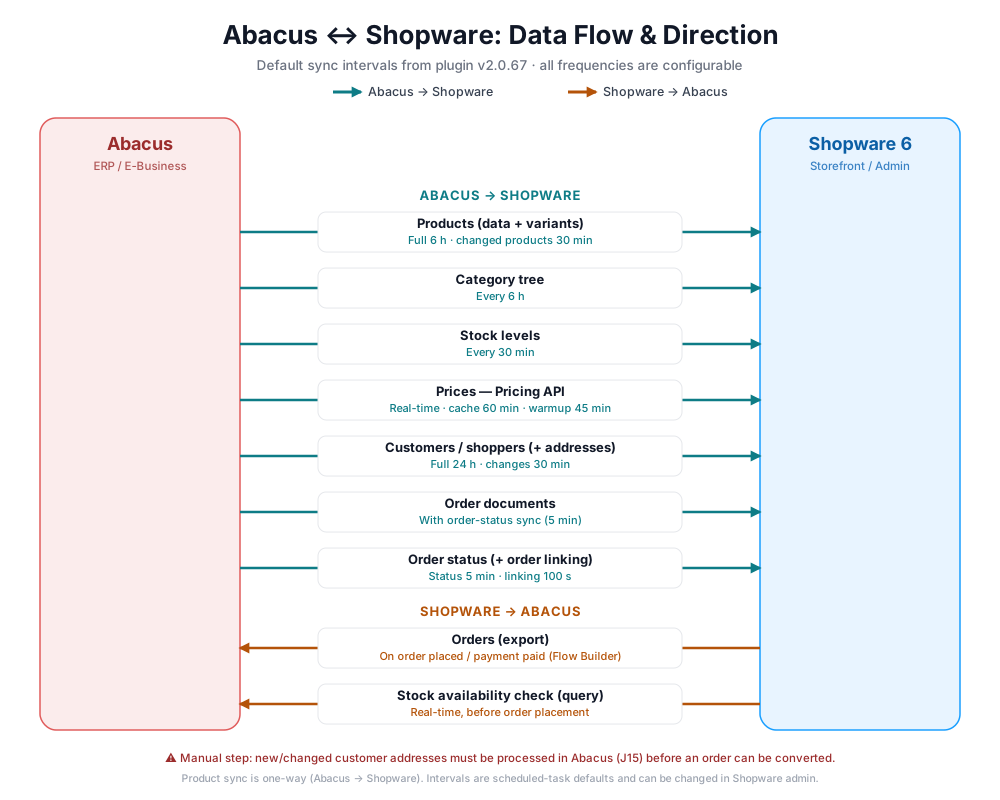
Direction of data flow
Products, prices, stock, customers, documents and order status flow Abacus → Shopware. Orders flow Shopware → Abacus.
How the plugin is structured
This documentation describes the base plugin, which is the same for every client. Individual clients usually have a client-specific extension on top of it for their own Abacus setup and business rules; those extensions are documented per project, not here. Some base-plugin behaviour is still configured per client (status mapping, document and discount mapping, shipping mode, multi-tenant).
Configured per client vs. requires an extension
"Configured per client" means a setting in the base plugin that is filled out differently by each plugin user. It does not mean the base plugin can map arbitrary Abacus data. Anything beyond the documented base functionality requires a client-specific extension — for example, mapping custom Abacus user fields (Userfields) into Shopware is always implemented in an extension and cannot be configured in the base plugin.
Capability matrix
| Area | ✅ What it does | ❌ What it does not do |
|---|---|---|
| Products | Full product sync or stock-only (PIM) mode (default: no product sync); syncs the category tree under a configurable parent; auto-creates manufacturers; stores Abacus product/variant IDs in custom fields | Push product data Shopware → Abacus (one-way only); sync anything in "No product sync" mode |
| Stock | Syncs stock on a schedule; real-time stock check against Abacus before order placement (blocks closeout products with insufficient Abacus stock) | — |
| Pricing | Real-time prices for guests and logged-in users; Standard/list, Graduation, Special and Action price types; rebates and customer-specific bulk pricing; caches prices for 60 min via the shop's configured cache pool, with a scheduled guest-price warmup; Shopware default price as fallback | Implement or require a specific cache backend (e.g. Redis) — that is the shop's own infrastructure; operate without a backup price in Shopware |
| Customers | Syncs shoppers → customers (24h full sync + scheduled change subscription); salutation & tax mapping; address duplicate recognition; sales-channel binding; collective debtor for guests | Detect Abacus address changes via subscription (needs the 24h full sync); handle multiple shoppers sharing one email when UUID = "Email" |
| Addresses | Maps billing/shipping/contact addresses; recognises duplicates by ID or field match | Auto-apply address changes — requires manual handling in Abacus (J15) before an order can be processed |
| Orders (export) | Sends guest, new- and existing-customer orders via a Flow Builder action; export timing configurable per payment method/status; shipping as ShippingHandlingList or a line item; marks exported orders with an abacus_order_sent custom field | Modify an order in Abacus once it's in the order inbox |
| Discounts | Percentage promotions on line items and shipping, mapped to Abacus discount types | Fixed-value discounts — ignored and not sent to Abacus |
| Documents | Syncs Abacus documents (e.g. order confirmation, delivery note) into the Shopware order & customer account, via a configurable type mapping | Sync documents for orders not exported to Abacus |
| Order status | Syncs order/shipping/payment status via configurable ProcessStep mapping (per client); links orders via custom fields; respects Shopware's state machine | Apply unmapped ProcessSteps (ignored); perform invalid state transitions |
| Setup | Live and Test mode (default: Test); multi-tenant (multiple Abacus instances, global or per sales channel) | — |
| Offers | – | Offers are not implemented, this needs to be implemented with a custom integration as Offers is not a default functionality Shopware (CE) provides |
Limits & known constraints
| Topic | Constraint |
|---|---|
| Compatibility | We always support the current latest + the prior version on both sides. Shopware: 6.7 and 6.6 / Abacus: 2026 and 2025. |
| Product sync | One-way only (Abacus → Shopware). The plugin never writes product data back to Abacus. |
| Discounts | Only percentage-based promotions are supported. Fixed-value promotions are silently ignored. |
| Address changes | Not applied automatically. New/changed addresses require manual processing in Abacus (J15) before the order can be converted. |
| Address change detection | Address edits in Abacus are not caught by the shopper change subscription; they require the 24h full shopper sync. |
| Customer identity | "Account" (email in the Account field) is the default and recommended UUID. With "Email", multiple shoppers sharing one email are not handled. |
| Order edits | Once an order is in the Abacus order inbox it cannot be modified by the plugin. |
| Pricing cache | Prices are cached for 60 minutes via the shop's configured cache pool. The plugin does not provide a cache backend (e.g. Redis) itself. |
| Order status mapping | ProcessSteps not present in your mapping are ignored — no status change occurs. |
Scheduled tasks & frequency
Values below are the code defaults (getDefaultInterval()). All intervals can be adjusted under Settings → System → Scheduled Tasks, and tasks can be triggered manually via the console or the Tools plugin.
| Scheduled task | Default interval | Purpose |
|---|---|---|
webwirkung.abacus.product.synchronization | 6 hours | Full product sync |
webwirkung.abacus.category.synchronization | 6 hours | Category tree sync |
webwirkung.abacus.subscription.product | 30 minutes | Syncs only products changed in Abacus |
webwirkung.abacus.subscription.stock | 30 minutes | Stock-level sync |
webwirkung.abacus.shopper.synchronization | 24 hours | Full customer/shopper sync — the only job that picks up Abacus address changes |
webwirkung.abacus.subscription.shopper | 30 minutes | Consumes shopper changes (excludes address changes) |
webwirkung.abacus.subscription.subscribe | 23 hours | (Re)registers the Abacus change subscriptions |
webwirkung.abacus.subscription.order | 100 seconds | Links Abacus orders back to Shopware orders |
webwirkung.abacus.subscription.order.status | 5 minutes | Syncs order/shipping/payment status from Abacus |
webwirkung.abacus.synchronize_product_id | 24 hours | Synchronizes Abacus product IDs onto Shopware products |
webwirkung.abacus.cache.warmup.price | 45 minutes | Pre-warms the guest price cache |
Getting started and requirements
To prepare your integration of Abacus and Shopware you can start with these steps:
- Ensure your Abacus and Shopware instances meet the supported versions — see Limits & known constraints above. Please note that for certain features, you may need to update your Abacus instance to a newer version.
- Enable E-Business in your Abacus instance and activate our API module according to the Abacus marketplace.
- Get the following information:
- API URL
- Mandant number
- Client ID
- Client secret
Useful links
Contact
If you have any questions or need help with the integration, please contact us at [email protected].